How to take the program for a test
 Sergey Tehnoway
How to download UniMessenger, register, and activate the free trial period.
The program has a free trial period of 3 days, so you can check the features and decide whether the program is right for you. A trial is available for all UniMessenger products except the Module.
To take the trial:
- Download the program here.
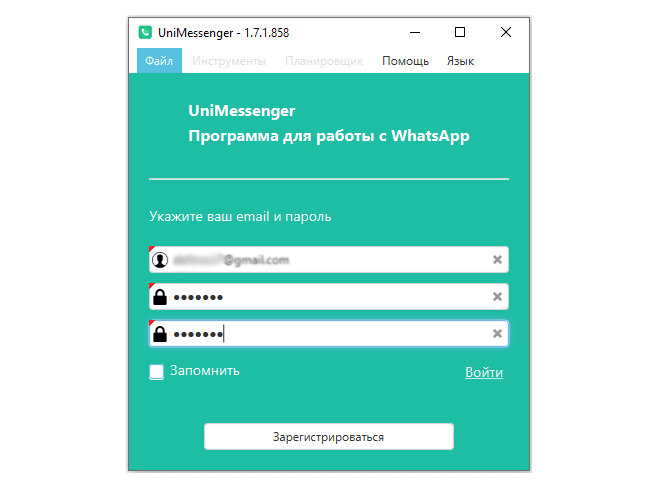
- Register through the program's interface. Enter an email address and create a password for sign-in (see screen 1).
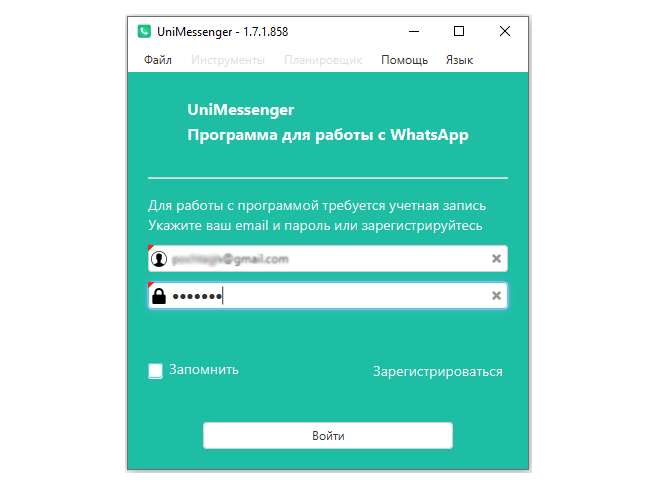
- Sign in. Enter the email and password you used for registration. Click "Sign in" (see screen 2).
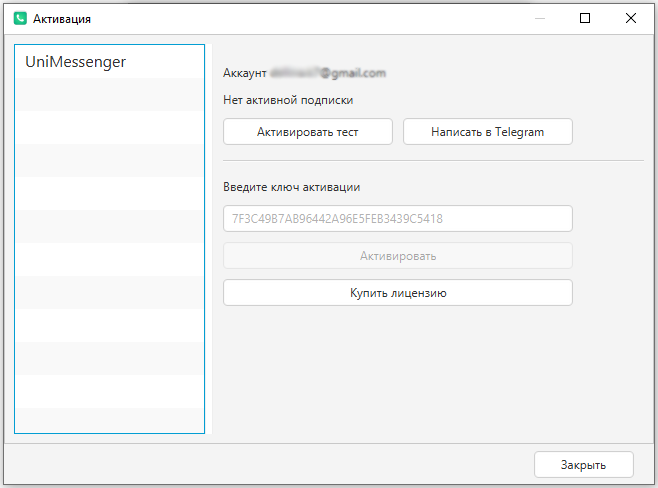
- Click "Activate trial" — it works automatically.
The trial doesn't activate automatically if you're activating it for a second time and in some other cases. For activation, send support the email you registered with and wait for a reply about the trial activation (up to 24 hours, usually ~10 min).
If you have an activation key, you can enter it in the activation field (see screen 3). If you run into any issues during activation, write to support with your key and the email you registered with.
If you have already registered and have any questions about the program, please include your email right away when chatting with support.